EcuBus-Pro Script API Documentation
Script
The script based on TypeScript/JavaScript in node.js environment. we use ts to do syntax check and use esbuild to build the script, the build script is in the .ScriptBuild folder.
Editor
Vscode is recommended to edit the script, you can install the TypeScript extension to get the syntax check and intellisense.
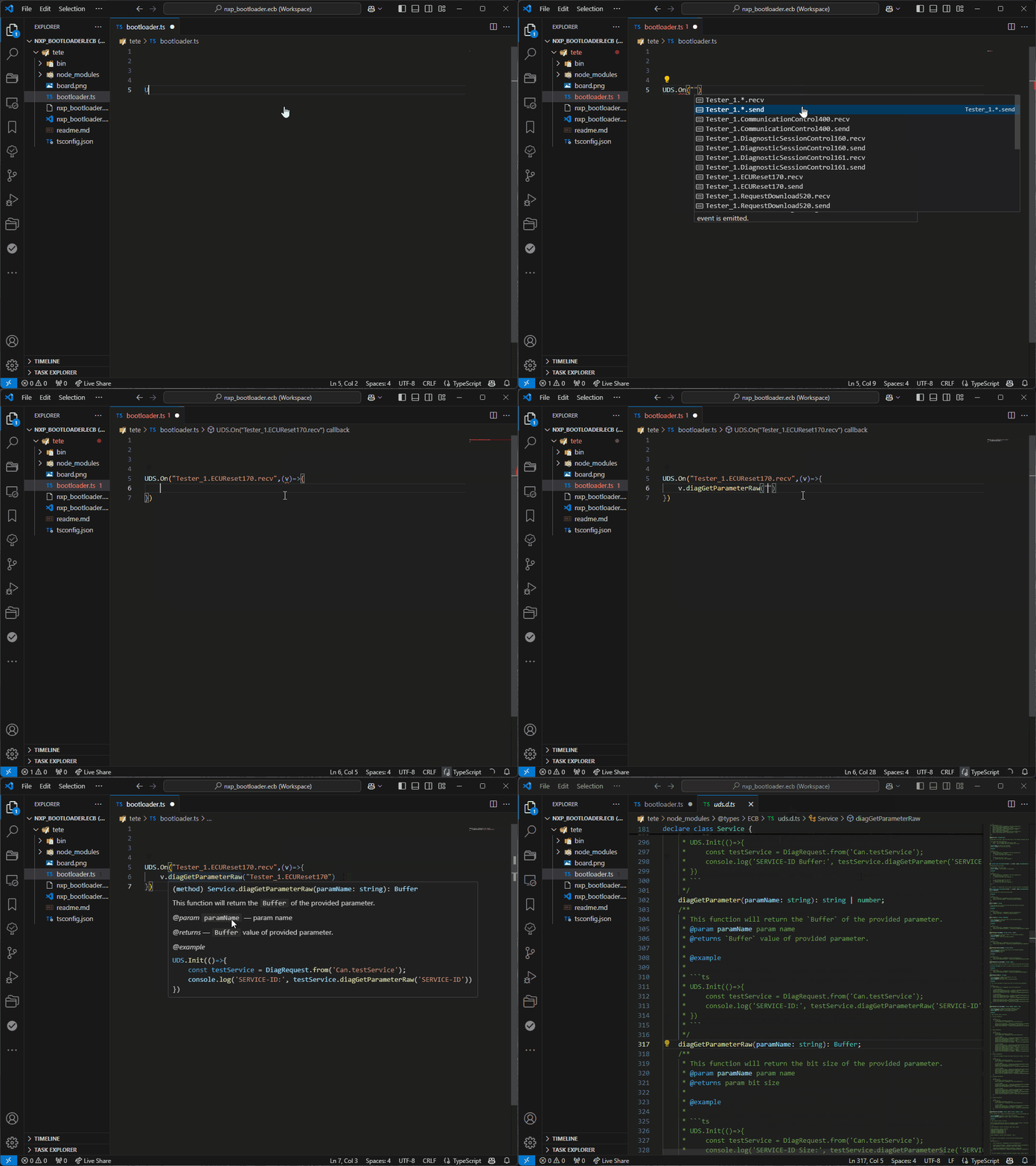
We also plan to provide a vscode extension to let you build the script in vscode directly.
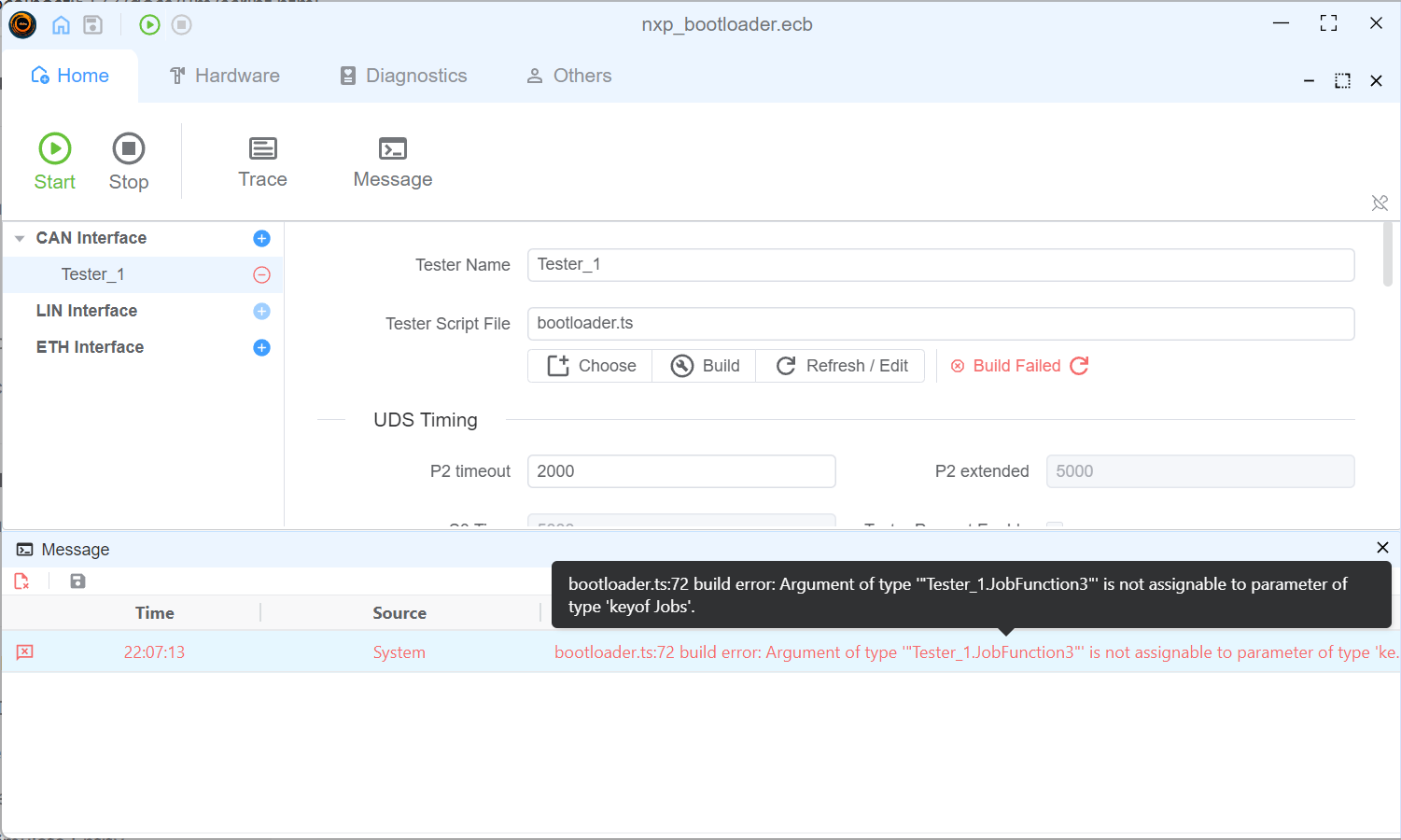
Build Script
 you can get the build error info in
 Message window if there is any error in the script.
Script API
You can open the API window to get the API info.

or check this online documentation API
Script Usage
Node.js Ability
Init
Init function is the entry of the script, it will be called when the script is loaded.
Util.Init(() => {
console.log('Init')
})
Timer
Timer is node.js built-in feature, you can use it to do some periodical work. more details about the timer, please refer to Timer
// periodical output can message
let timer = setInterval(() => {
outputCan(canMsg)
}, 1000)
// stop the timer
clearInterval(timer)
//refresh the timer
timer.refresh()
OnKey
listen to the key event, you can use it to do some work when the key is pressed.
// listen to the key event
Util.OnKey('s', () => {
outputCan(canMsg)
})
OnCan
listen to the can message, you can use it to do some work when the can message is received.
// listen to the can message
Util.OnCan(0x1, (msg) => {
console.log(msg)
})
// listen all can message
Util.OnCan(true, (msg) => {
console.log(msg)
})
On
listen to the uds message.
${tester name}.${service item name}.recv is used to listen to the uds message received.
${tester name}.${service item name}.send is used to listen to the uds message send.
// listen to the uds message
Util.On('Can.DiagRequest.recv', (msg) => {
//receive diag response
})
Util.On('Can.DiagRequest.send', (msg) => {
//receive diag request
})
runUdsSeq progress
runUdsSeq runs one configured sequence (TesterName.SequenceName). Calls without a callback are unchanged. Pass onProgress to learn which enabled item is running and the overall percentage. The callback runs when the item starts (phase: 'start') and again when it finishes (phase: 'finish').
index is the 0-based position among enabled items, total is how many of those items will run, and pct moves from 0 at the first start to 100 after the last finish. Disabled items are skipped. If an item fails and stops the sequence, that item has a start event only and the promise rejects. A callback that throws, or returns a rejected promise, is logged and does not stop the sequence. The callback is not awaited.
import { runUdsSeq } from 'ECB'
await runUdsSeq('Tester.Seq0', {
onProgress(info) {
console.log(`${info.phase} ${info.index + 1}/${info.total} ${info.name} ${info.pct}%`)
}
})
// Device name and progress together
await runUdsSeq('Tester.Seq0', 'Device1', {
onProgress(info) {
console.log(info.serviceId, info.pct)
}
})
Example
::: details Send 10 CAN messages on script initialization, then send one more message after 30s delay {open}
async function sendCanMessage(msgId: number, targetId: number, dataPattern: string) {
console.log(`sendCanMessage called with msgId: ${msgId}, targetId: ${targetId}`);
const dataBytes = Buffer.from(dataPattern.repeat(8), 'hex');
console.log("Total Length:", dataBytes.length);
const fdMsg: CanMessage = {
id: targetId,
dir: 'OUT',
data: dataBytes,
msgType: {
idType: CAN_ID_TYPE.STANDARD,
brs: true,
canfd: true,
remote: false,
}
};
try {
await output(fdMsg);
} catch (error) {
console.error(`CAN FD 发送失败 (ID: ${msgId}):`, error);
}
}
Util.Init(async () => {
console.log("Init");
// 循环 10 次,定义不同的消息 ID 和数据内容
for (let i = 0; i < 10; i++) {
const msgId = 0x510 + i;
const targetId = 0x520 + i;
const dataPattern = i % 2 === 0 ? '1234567890ABCDEF' : 'FFAABBCCDDEE5599';
await sendCanMessage(msgId, targetId, dataPattern);
}
setTimeout(() => {
console.log("Timeout triggered, preparing to send CAN message...");
const msgId = 0x510 + 10;
const targetId = 0x520 + 10;
const dataPattern = 'DEADBEEFCAFEBABE';
sendCanMessage(msgId, targetId, dataPattern);
}, 30000); // 延时 30 秒
})
:::