
EcuBus LinCable – USB to LIN Adapter for Automotive Development
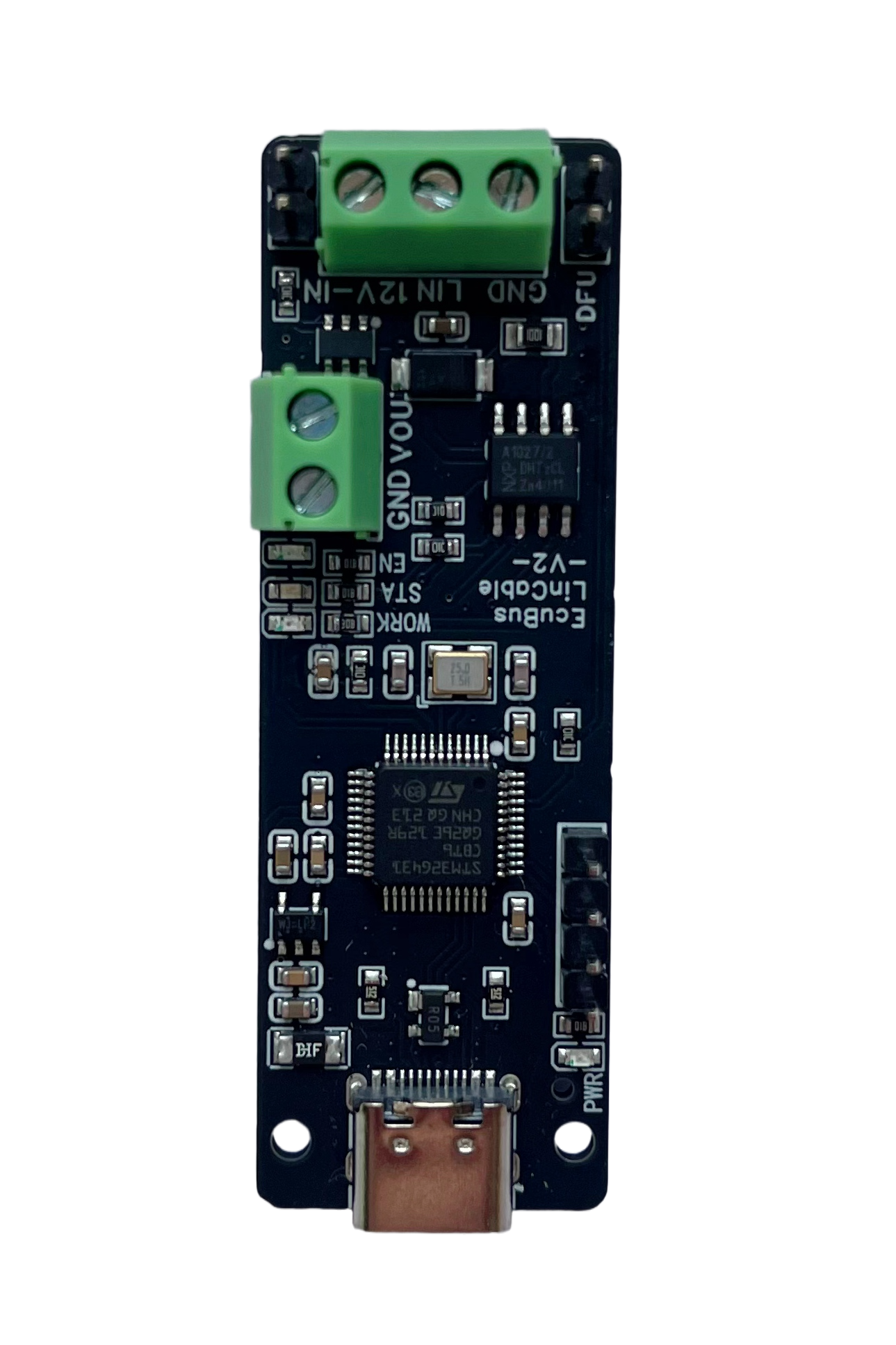
EcuBus LinCable-V2
USB to LIN Adapter for Automotive Development
The EcuBus LinCable adapter enables seamless connection of a LIN network to a computer via USB Type-C. Supporting a single LIN channel.
Board dimensions: 59mm (height) × 19mm (length)
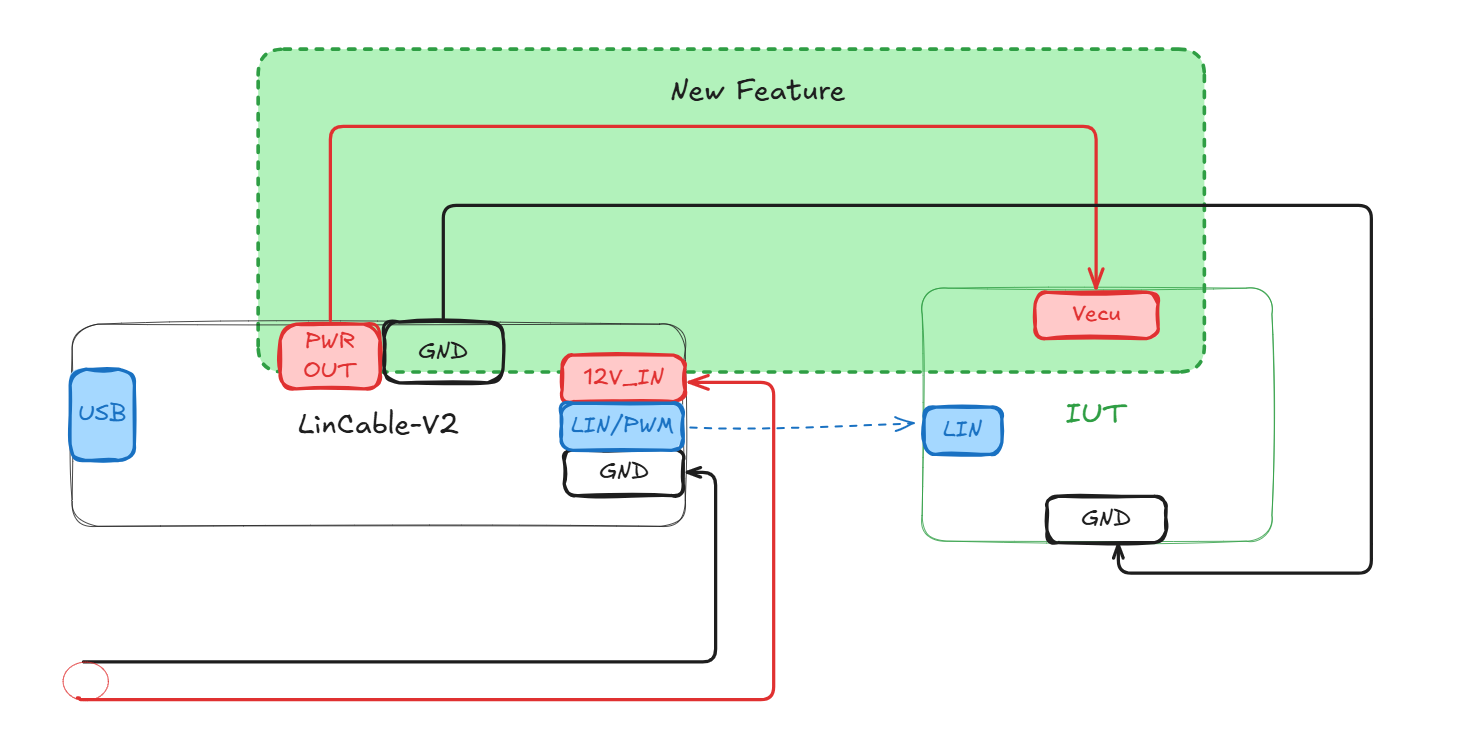
Diagram
LIN Protocol Support
LinCable fully supports the LIN 2.0, 2.1, 2.2A, and SAE J2602 standards, providing compatibility with a wide range of automotive LIN devices and networks. Supported baud rates include 19200, 10400, 9600, and 2400 bps, making LinCable suitable for both legacy and modern LIN applications.
Custom Baud Rate Configuration
LinCable supports custom baud rate configuration beyond the standard rates, allowing you to set any baud rate between approximately 107 bps and 2,750,000 bps. This is achieved through a two-stage prescaler system:
- Major Prescale: Configurable from /2 to /256 (8 options: 0-7)
- Minor Prescale: Configurable from 1 to 32
The baud rate is calculated using the formula:
baudRate = 5,500,000 / (2^(prescale + 1) × bitMap)This flexibility enables LinCable to work with non-standard LIN implementations and custom protocols that require specific baud rates not covered by the standard rates.
Runtime Baud Rate Control
LinCable provides runtime baud rate control through the linBaudRateCtrl() API function, allowing you to dynamically change the baud rate during operation without reinitializing the device. The function automatically calculates the optimal prescale and bitMap combination to achieve the closest possible baud rate to your target value, and returns the actual baud rate achieved.
Key Features:
- Automatic optimization: Finds the best prescale/bitMap combination to minimize error
- Real-time adjustment: Change baud rate on-the-fly during testing
- Precise control: Returns the actual baud rate achieved for verification
- Wide range: Supports baud rates from ~107 bps to 2.75 Mbps
This capability is particularly useful for:
- Testing devices with non-standard baud rates
- Adapting to different LIN network configurations dynamically
- Protocol development and validation
PWM Output Capability
LinCable includes advanced PWM output functionality, making it a versatile tool for automotive development and testing. The PWM output feature enables precise control of digital signals for various automotive applications.
PWM Output Specifications
- Frequency Range: 1 Hz to 20KHz with high precision
- Duty Cycle Control: 0% to 100% with 0.1% resolution
- Output Voltage: High level equals VBAT input voltage, low level equals 0V
- Channel Count: Single PWM output channel
- Frequency Accuracy: ±0.1% typical
Power Control
LinCable provides integrated power supply control for the IUT (Item Under Test), enabling automated power cycling and power management during testing. This feature eliminates the need for external power supplies and simplifies test setups.
Power Control Specifications
- Maximum Current: 2A
- Maximum Voltage: 18V
- Control Method: Software-controlled via API
- Power State: On/Off control
Runtime Power Control API
The linPowerCtrl() function allows you to dynamically control the IUT power supply during runtime. This is essential for:
- Power Cycling Tests: Automatically power cycle devices to test recovery behavior
- Power-On Sequencing: Control power-up timing for complex test scenarios
- Energy Management: Turn off power when not needed to save energy
- Automated Testing: Integrate power control into test sequences
API Usage:
// Turn on power
await linPowerCtrl(true);

// Turn off power
await linPowerCtrl(false);

// Control power on specific device (when multiple devices connected)
await linPowerCtrl(true, 'Device1');
Use Cases:
- Testing device behavior during power-on and power-off sequences
- Validating recovery procedures after power loss
- Implementing automated test sequences with power management
- Reducing power consumption during idle periods
- Simulating power supply interruptions for robustness testing
Fault Injection and Conformance Testing
With built-in advanced fault injection capabilities, LinCable allows engineers to simulate various error conditions and perform comprehensive conformance testing. This is essential for validating the robustness and reliability of LIN nodes and networks during development and quality assurance.
Follow ISO/DIS 17987-6
Break Field/Delimiter Length Control
- Break Length Length: Adjustable break field length from 13 to 26 bits (default: 13 bits)
- Break Delimiter Length: Configurable delimiter length from 0 to 14.6 bits (default: 1 bit)
Inter-byte Spacing Control
- Header Inter-byte Space: Control spacing between sync byte and identifier field (0-14 bits, default: 0)
- Data Inter-byte Space: Individual control of spacing between each data byte (0-4 bits per byte)
Sync/PID Field Customization
- Sync Value Override: Custom sync byte value or disable sync transmission entirely (default: 0x55, false means master do not send sync val)
- PID Override: Custom Protected Identifier (PID) value or disable PID transmission (default: getPID(frameId), false means master do not send pid)
Bit-level Fault Injection
- Precise Bit Manipulation: Inject faults at any specific bit position starting from the break field
- Bit Value Control: Force specific bits to high (1) or low (0) states
Checksum Override
- Checksum Override: Override the checksum with a custom value
Custom Pulses
- Custom Pulse Sequences: Send arbitrary high/low pulse sequences on the LIN bus (LIN idle high, alternates high/low)
- Bit-time Units: Each element is length in bit-time units based on the current baud rate
- Array Length = Count: Array length = pulse count (max 64)
- Pulses Only: When set, sends only custom pulses (no LIN frame)
- Use Cases: LIN wake-up patterns, break timing tests, custom signal injection
Configure via frame.lincable.customPulses (array of lengths):
import { output, LinDirection, LinChecksumType } from 'ECB'

// Send custom pulses: high 10 bit-times, low 5 bit-times
const wakeupFrame = {
  frameId: 0,
  data: Buffer.alloc(0),
  direction: LinDirection.RECV,
  checksumType: LinChecksumType.ENHANCED,
  lincable: { customPulses: [10, 5] }
}
await output(wakeupFrame)
See Lin Conformance Test Example for more details.
Cross-Platform and Software Integration
LinCable is fully compatible with Windows, macOS, and Linux operating systems (USB-ACM driver). It integrates seamlessly with the EcuBus-Pro software suite, and also supports third-party automotive development tools. A comprehensive SDK and API are provided for custom application development.
Open Communication Protocol for Secondary Development
LinCable provides an open communication protocol that enables users to perform secondary development and customization according to their specific requirements. The protocol is well-documented and includes comprehensive APIs, allowing developers to integrate LinCable into their own applications or create custom solutions for specialized automotive testing scenarios. This open architecture ensures flexibility and extensibility for advanced users who need tailored functionality beyond the standard features.
DFU Firmware Update Support
LinCable supports Device Firmware Update (DFU) functionality, allowing users to easily update the device firmware to the latest version or install custom firmware. This feature ensures that LinCable can be kept up-to-date with the latest improvements, bug fixes, and new features without requiring hardware replacement. The DFU process is straightforward and can be performed through the EcuBus-Pro software or dedicated DFU tools, providing a reliable and safe method for firmware updates.
FW Upgrade Guide
To upgrade the LinCable firmware, follow these steps:
Install the Plugin: First, install the
LinCable Upgrade Toolplugin from the Plugin Marketplace.Follow Plugin README: After installation, refer to the plugin's README documentation for detailed upgrade instructions and follow the steps provided there.
FW Download
| Version | Download Link |
|---|---|
| 1.2.0 | Download Link |
| 1.3.0 | Download Link |
FW Release Note
1.3.0
- add dynamic change baud rate feature
1.2.0
Frist Release